
| The Accounting tab |
| Prev | Configuring KAutodial | Next |
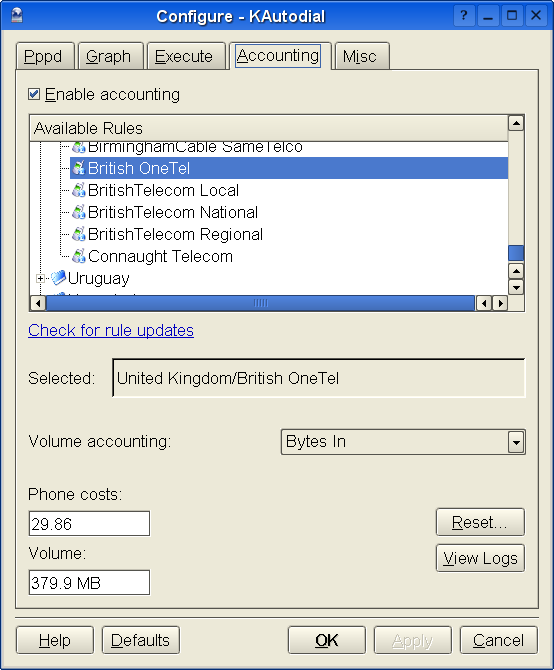
The Accounting tab
Check the Enable Accounting box to enable or disable telephone cost accounting for this account.
Select from the list the applicable rule for your telecoms provider.
If you can't find one, you can write one yourself by copying the supplied template, which you will find in an appendix.
Below that is the option for Volume Accounting, described below.
If you select an account, and you have turned on accounting then the accumulated information for that account will appear in the two panels labelled Phone Costs: and Volume: respectively.
To the right of the accounting display, are two buttons: Reset... and View Logs.
Pressing Reset... will reset the Phone Costs: and Volume: information to 0. You would typically want to do this once a month or quarter, when you have received your phone bill and reconciled the telephone costs. You can reset either independently, and are offered the choice of which item you want to reset, when you press the Reset button.
Pressing View Logs will open another window, where a log of all the calls made with KAutodial will be displayed. If you have kept logs, you can move forward and backward, in monthly steps. This might be useful if you have received an abnormally large phone bill and are investigating why!
Basically, it means to count the number of bytes transmitted to and from the Internet. KAutodial can count incoming bytes, outgoing bytes, or both. It's up to you what you want (or must) use.
Many Internet Service Providers bill their customers based on the number of bytes transferred. Even more commonly, ISP's offer a flat rate up to some arbitrary transfer limit, and then charge more for every megabyte above this limit. KAutodial shows you your current volume and can help you keep your bills to the minimum. Of course, even if you're not billed based on volume, you can turn on volume accounting just to satisfy your own curiosity.
That depends mainly on your provider. Many of them only count how many megabytes you download from the Internet,and ignore how much you send. In that case you should choose Bytes In. If you have to pay for both, you should choose Bytes In and Out. Bytes Out is really only here for completeness, as we're not aware of any providers using it as a billing basis. It might be useful to those of you running a web or FTP server at home though.
Unfortunately, there is a drawback on volume accounting. KAutodial will only count the number of bytes, regardless of their origin. Many providers set their limit only for Internet access, and not for data on their own network. Some providers set different limits for data that is on their own network, in the same country, and coming from overseas. So, if you're doing not much websurfing, and getting most of your pages from your ISP's own proxy cache, then your provider is probably not charging you for that data. KAutodial will not know these IP packets are coming from the proxy, and so it will count them. So if you this situation applies to you, or, as another example, your provider uses a caching news server such as nntpcached, then the volume reported by KAutodial may be higher than the amount you are going to be billed for. On the bright side, at least KAutodial will never underestimate your bills.
| Prev | Home | Next |
| The Execute tab | Up | The Misc tab |